Monday, December 10, 2018

Adobe Animate/Flash Intro

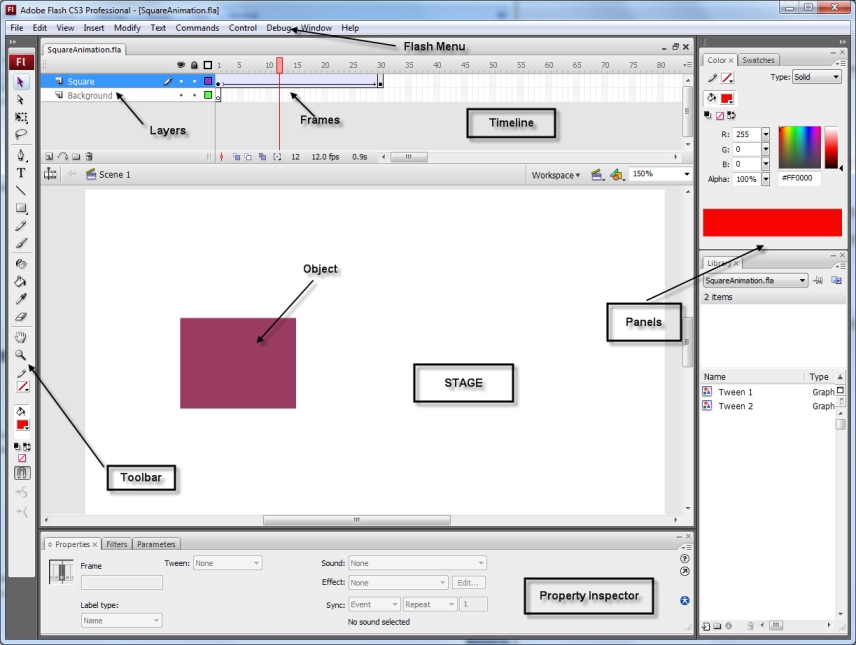
We are going to begin to learn how to draw and animate in Adobe Animate. Animate is a fun program that makes animation easy... well it takes a bit of time to learn, but there are many things it can do. It can help you create digital animations, help you design games, and help generate cool websites. I say it can help, because you are the designer and creator, you have to make the choices to create your piece.


We are going to learn about the following:
  • The stage
  • Timeline
  • Properties
  • Tool bar
  • Library
  • Document set-up
  • Scale
  • Colour- Tone/alpha
  • Frame by frame animation
  • Onion Skins

Friday, November 16, 2018

Photoshop Andy Warhol Portraits

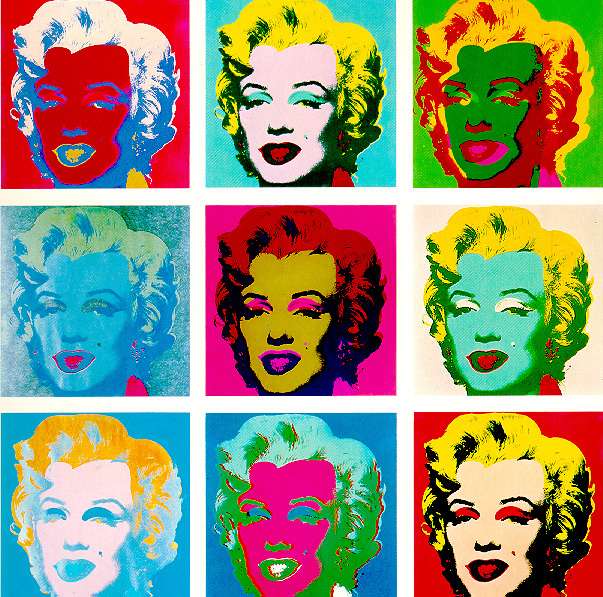
We are going to play with your face using Adobe Photoshop. In this assignment, you are going to learn about basic photo editing and maniulation techniques while creating a multi- image "Andy Warhol" like piece.

First research Andy Warhol. Find a portrait and post it to your blog. Find some information about him and write interesting points about him, his work, and the significance of his work in your own words.

Then we need a photo of you- we will take photos in class of you.
We are going to learn about basic Photoshop Techniques:
  1. Basic tool bar functions.
  2. Sizing and cropping an image. 3 in x 3 in @ 300 dpi.
  3. How to adjust exposure- Image- Adjustments- Levels.
  4. Filters: Find Edges, Posterize, Cut Out, Brush Strokes, Artistic,
  5. Image- Adjustment techniques: Invert, Hue & Saturation, Posterize, Replace Colour
  6. and several combinations of the filters and adjustments.

Tuesday, October 16, 2018

Photoshop Portrait Editing Tutorials

'

We are going to take your portrait in the LFAS Photography Studio. You will have a few poses to choose from. But for now, use a portrait from Pexel:
https://www.pexels.com/search/portrait/
I have posted a couple of portraits above if you want to start.

Then you are going to edit/touch up your portrait. I will show you a few techniques, but try a few things on your own.

Here are some Phlearn tutorials:
Quick Start Guide Part 1- Essential things you should know about Photoshop:
https://www.youtube.com/watch?v=ryOgl4EDgn8

Quick Start Guide Part 2:
https://www.youtube.com/watch?v=uPtnmc2pRQo

Quick Start Guide Part 2:
https://www.youtube.com/watch?v=6vpC08fl96A

Fun Portrait Tutorials:
https://www.youtube.com/watch?v=zl-SZ0C1jLY

Layer masks- really important to learn in Photoshop:
https://www.youtube.com/watch?v=h5yW5hHjQrE

How to cut images out of the background:
https://www.youtube.com/watch?v=MmDmq8sQ2Yg

How to whiten teeth:
https://www.youtube.com/watch?v=RvCDzD_mDHo

Clean up eyes:
https://www.youtube.com/watch?v=Z33cgxtSYXY

How to change eye colour:
https://www.youtube.com/watch?v=zMmzoYZpg_Q

How to change hair colour:
https://www.youtube.com/watch?v=SfGupxCdIVQ

Friday, September 14, 2018

My Banner

Here is my banner with the clipping mask and drop shadow also with inner glow. I also lightened the text with image adjustments.

Friday, September 7, 2018

Setting up your blog

Starting Your Computer Arts Blog


We are going to create a class blog together using Google Blogger so you can post your Computer Arts progress there. Here is the address:

lfascomparts@gmail.com
Password: lfas2017

  • Open Google using Firefox or Google Chrome- DON'T USE Internet Explorer.
  • Sign-in using the email address- lfascomparts@gmail.com and password- lfas1234.
  • Click on the ap icon at the top right of your page. See icon >
  • Start a new blog with a title- your blog title should have your name somewhere in it. 
  • The address has to be something completely original- no one else in the world has it. 
  • Then select Theme> Customize to personalize it with colours, fonts, backgrounds. 
  • Make sure to keep it private/restrict access.  Settings> Basic>Permissions
  • As we create new work, we will personalize it even more with a profile photo etc. 
Next:
  • Start your first post. Write a short paragraph: If you could change yourself into an animal,  what sort of animal would you be and why? Find an image of the animal.
  • Then write about your computer experience and any sort of programs you have experience with. And what is your major?
  • Then are going to start making a name banner for your blog using Adobe Photoshop.
  •  
     
Here is a Blogger tutorial for more help:
Blogger help

[Last Semester]
Computer Arts1
Password: lfas2017
Password: lfas1234